Public beta on iPhone

Know what's next for your baby.

Log sleep, feeds and diapers in one tap. Tuckle learns your baby's rhythm, shows when the next nap or feed is likely, and keeps every caregiver in sync.

Free · No ads · No tracking · No account · iOS 26 or later

Open the link on your iPhone. It installs Apple's TestFlight app first if you don't have it.

The Now screen: time since the last meal, bottle, nursing and diaper, how long the baby has been awake, and Up next: the 2nd nap in about 2 hours with its time window and the reason, then bedtime, the evening feed and dinner.
What's next, and why.
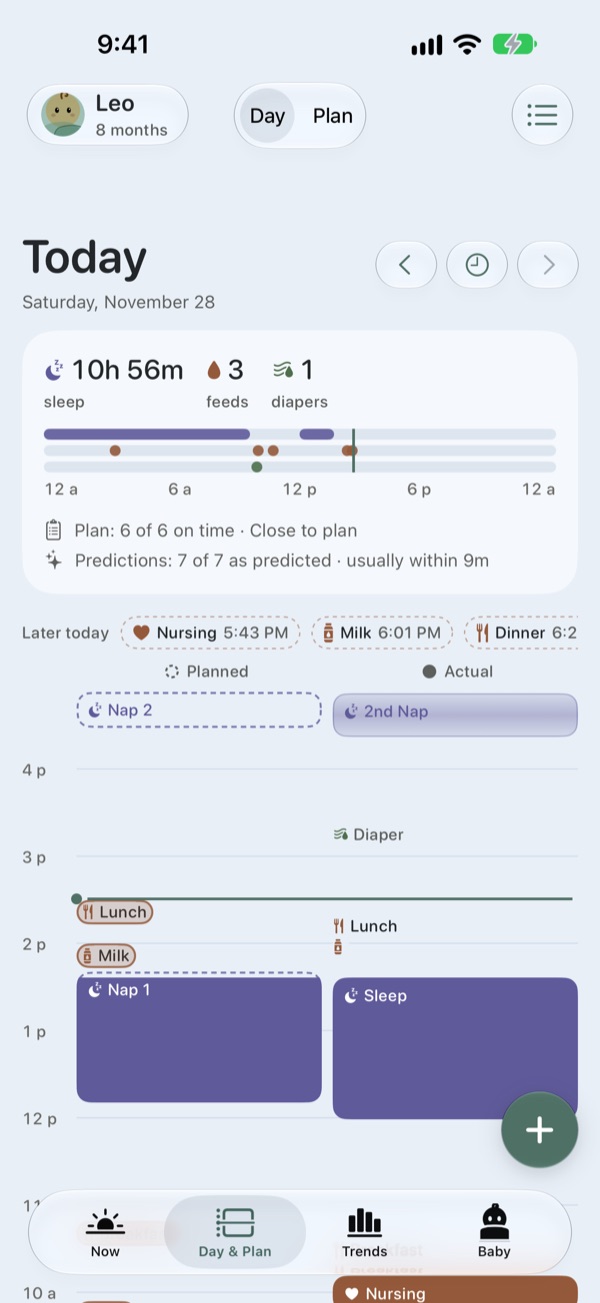
The Day screen: today's sleep, feeds and diapers on a 24-hour strip, a plan and prediction score, and a timeline with planned and actual columns.
The whole day, side by side.
How it works

Set up in a minute

  1. Add your baby

    A name, a birth date, and a starting routine for their age that you can adjust. No sign-up.

  2. Log as it happens

    One tap from the + button, a widget or Control Center.

  3. See what's next

    Predictions start from what's typical at your baby's age and get closer with every day you log, usually within a couple of weeks.

  4. Invite your partner

    Send an iCloud invite, and you both see the same log.

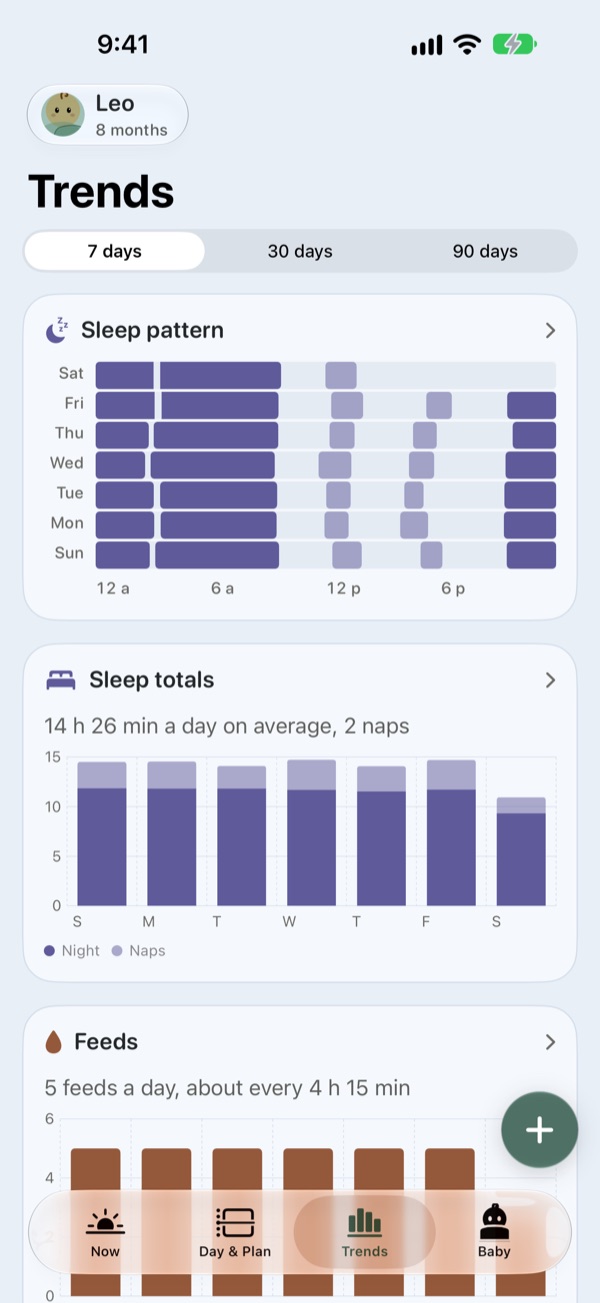
The Trends screen over 7 days: a sleep pattern grid by day and hour, nightly and nap sleep totals, and feeds per day.
A week of sleep at a glance.
Features

What a notebook on the fridge can't tell you

Every caregiver logs in the same place, and Tuckle turns those logs into answers.

Up next

A window, not a guess.

Up next shows what's coming for sleep and feeds, the next nap and bedtime, the next feed and meals, each with a time window and a plain reason: “About 3 h 5 min after the 1st nap ends.” If a nap runs late, it says so and the rest of the day moves with it. A quiet line keeps the next diaper change in view.

While a nap or feed is going, a bar shows how long it usually lasts: “Wake-up in about 20–40 min”, with the plan's time beside it. A baby who wakes after 20 minutes and drifts back off is still on the same nap, and a 2 AM wake is a night wake, not the start of the day.

Your routine counts too, and every estimate is worked out on your iPhone from your own logs. A quiet line says what it's based on, from “typical for babies this age” to “Leo's last 2 weeks”. If you'd rather just keep a log, turn predictions off.
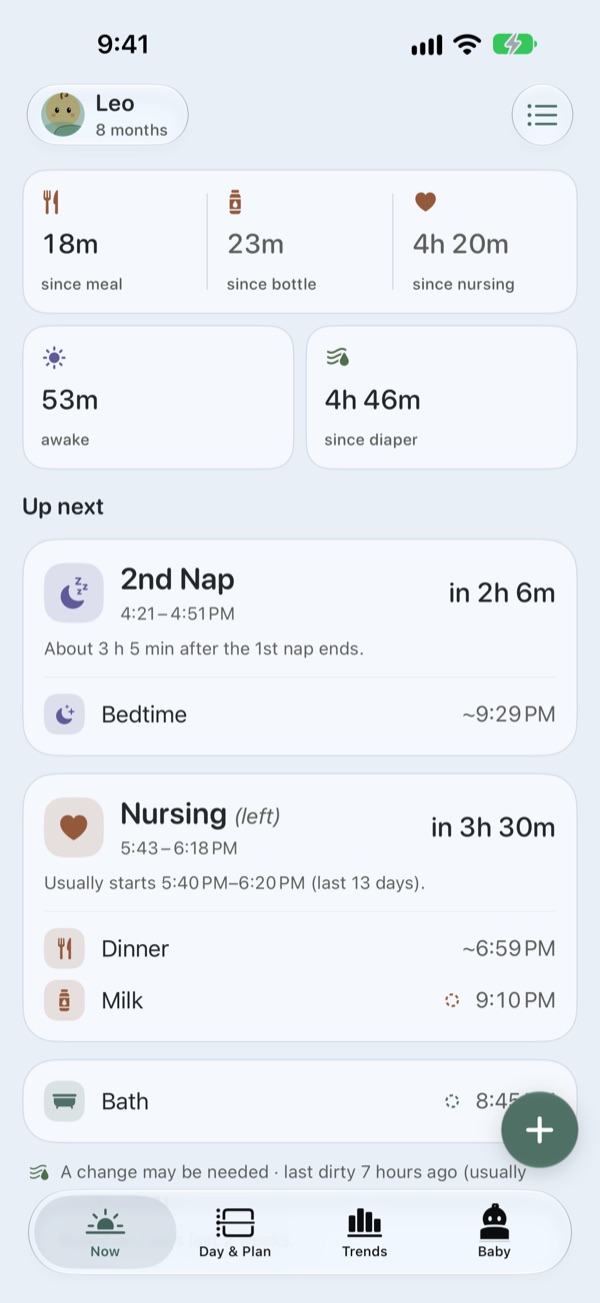
Up next: the 2nd nap in about 2 hours, 4:21 to 4:51 PM, about 3 hours after the 1st nap ends; then nursing in 3 and a half hours, with the evening's dinner and milk.
Every estimate shows its reasons.
Day & Plan

Plan, prediction and reality.

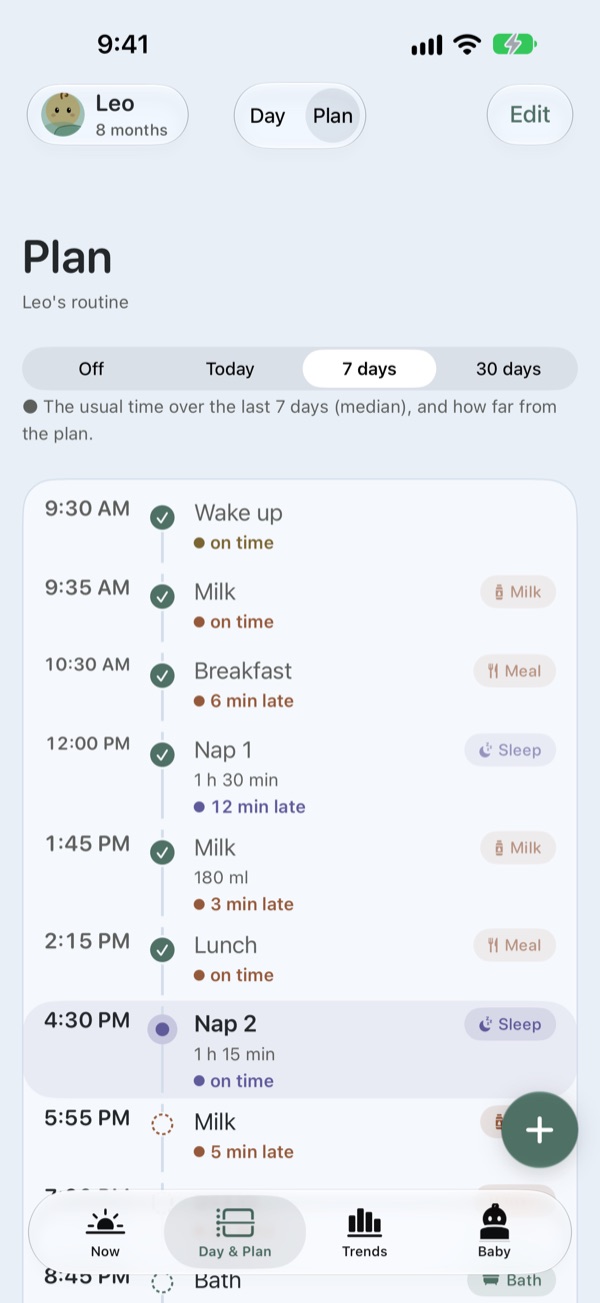
Write the routine you're aiming for. The Day timeline puts it next to what actually happened, and Plan scores each item against today, or your typical 7 or 30 days.

  • Times follow the real wake-up; bedtime can stay fixed.
  • Your bedtime and morning set the night, so a wake in between is never mistaken for the day starting.
  • “10 min late”, “on time”, “usually 9:52 AM”.
  • On by default; turn the tab off in Baby → This iPhone if you only want the basics.
The Plan screen: the routine from wake-up at 9:30 AM, each item with its logged time and how early or late it was.
The routine, scored.
Caregivers

One baby, every caregiver.

Invite a partner, grandparent or nanny with an iCloud link. Everyone logs into the same timeline, and each entry shows who made it. Caregivers can be view-only.

Twins or siblings? Add each baby and switch between them at the top of the screen.

Widgets

Log without opening the app.

The Next up widget shows what's coming and when, with shortcuts that open a sleep, nursing, bottle or diaper log, each with its time since. Happening now runs the sleep or feed going on, with how long it usually lasts: start or stop each side, finish nursing, or wake up, right from your Home Screen. Since last keeps the time since the last feed, nap and diaper in view.

  • Live Activities keep a running sleep or feed, and the countdown to what's next, on the Lock Screen and in the Dynamic Island.
  • Lock Screen widgets: what's next, time since, and a ring that fills as the next feed nears.
  • Controls start a sleep, start nursing or log a wet diaper from Control Center or the Action button.
Next up widget: Nap 2 in 42 minutes with its time window, and Sleep, Nurse, Bottle and Diaper buttons, each with the time since it was last logged. Happening now widget: nursing on the right for 11 minutes, 8 on the left and 3 on the right, a bar showing the feed usually ends within 7 minutes, and Left, Stop right and Done buttons. Since last widget: bottle 1 hour 19 minutes ago, awake for 52 minutes, diaper 44 minutes ago, a meal 3 hours 4 minutes ago.
Next up, Happening now and Since last, on your Home Screen.
Milestones

Firsts, kept as memories.

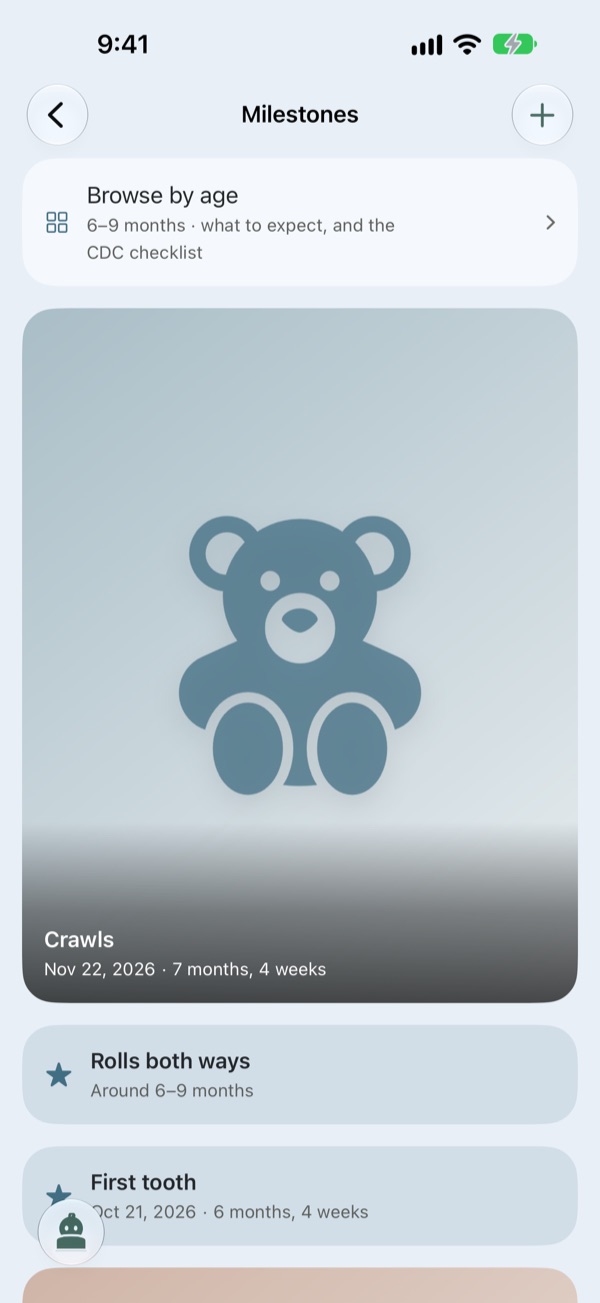
Every milestone is a memory: a big photo, the date and how old your baby was, and a note. Add your own, or browse what to expect at each age, from the first weeks to 5 years, and tick off the ones that already happened, with or without a date.

  • Nearly 200 milestones from the CDC and the American Academy of Pediatrics, each with its source.
  • Firsts to keep too: first bath, first haircut, first trip.
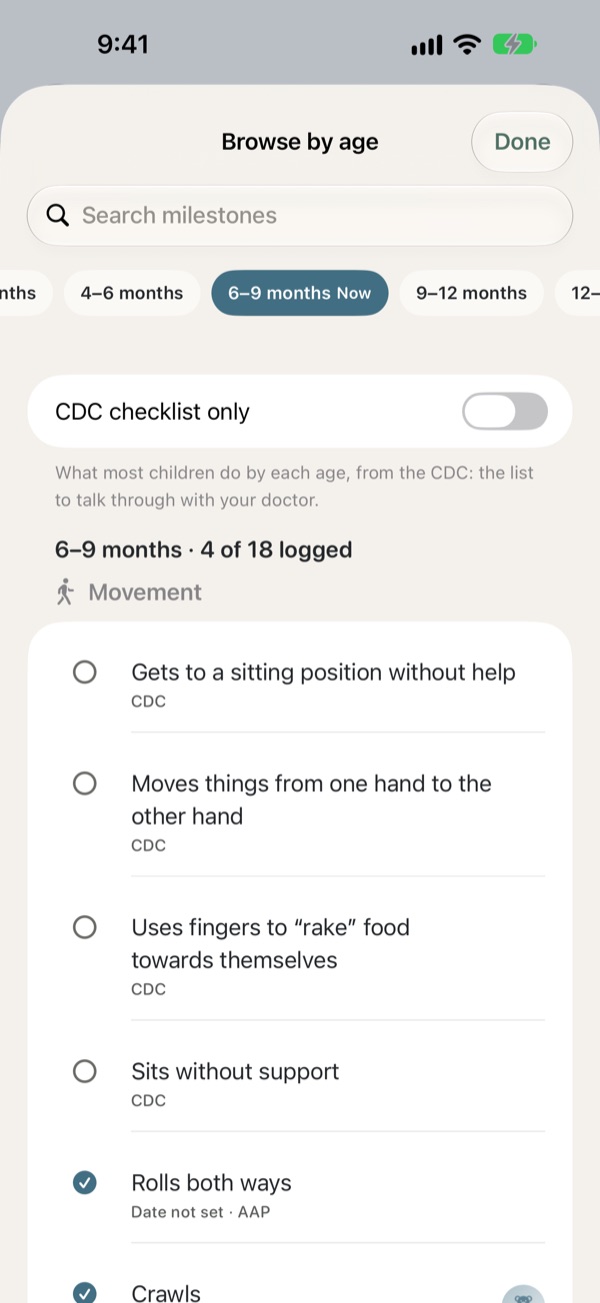
  • The CDC checklist for each age, to talk through with your doctor.
Milestones as memories: a large photo card for Crawls, at 7 months 4 weeks, then Rolls both ways and First tooth.
Every first, with its photo.
Browse by age: age chips with 6 to 9 months marked Now, a CDC checklist toggle, and movement milestones to tick off.
What to expect at each age.
Worth watching

A gentle note, with its source.

If the diapers you log fall outside general CDC and AAP guidance for your baby's age and feeding, for example no dirty diaper in a few days on formula, a quiet card says so, quotes the guidance and links to it. It only speaks up on days that look fully logged, and you can dismiss it.

It isn't medical advice. It covers only a few signs and can't tell whether anything is wrong. If you're worried, contact your pediatrician.

Checkups

Ready for the pediatrician.

  • Growth on WHO percentile charts
  • Vaccines on the US CDC schedule, with due dates you can turn off
  • Milestones from birth to 5 years, from the CDC and the AAP
  • Medicines and temperatures
  • A one-page doctor report of the last 7 days, as a PDF

Tuckle is a log, not medical advice. For anything about your baby's health, talk to your pediatrician.

Your data

Bring your history with you.

Import a CSV export from Nara Baby, or from Tuckle itself. Export everything for a baby as a spreadsheet at any time.

Demo

A nap, a plan and a month in 30 seconds

Start a nap and see when the wake-up is expected, then check the day against the plan and the last 30 days.

Video not playing? Download the demo (MP4).

Privacy

Private by design, and you can check

Your baby's logs stay on your devices and in your own iCloud. We can't see them.

No account

Nothing to sign up for. Sync and sharing use the iCloud account you already have.

Nothing collected

No analytics, no ads, no third-party SDKs. The App Store label reads “Data Not Collected”.

Yours to take or erase

Export a CSV any time. Delete a baby, and it's erased from every device after 7 days, or straight away.

Don't take our word for it

Turn on App Privacy Report in Settings → Privacy & Security, use Tuckle for a day, and look for it in the list. Tuckle has no servers of its own to contact; iCloud sync is handled by iOS. Read the privacy policy.

FAQ

Questions, answered

What does it cost?

Tuckle is free during the beta, and version 1.0 will be free with no in-app purchases. There are no ads.

How do I join the beta?

Open the TestFlight link on your iPhone and tap Accept, then Install. If you don't have TestFlight yet, the link takes you to it on the App Store first. Beta builds expire after 90 days; TestFlight updates you to the newest one.

Do I need an account?

No. Tuckle works on its own on one iPhone. To sync between your devices or share with other caregivers, sign in to iCloud on your iPhone.

Can a nanny or grandparent use it?

Yes. Each person they invite needs an iPhone with iOS 26 or later and an Apple Account. You choose whether each caregiver can log or only view.

Does it work for twins?

Yes. Add as many babies as you like; each one has its own log, plan, predictions and caregivers.

How accurate are the predictions?

They start from what's typical at your baby's age and learn from your logs. The more regular the days, the closer they get, usually within a couple of weeks of logging. Babies without much of a routine get wider windows, and Tuckle says so. Up next always shows what an estimate is based on, and you can turn predictions off in Baby → This iPhone to just keep a log.

Is it medical advice?

No. Tuckle records what you enter and shows reference data from the WHO and CDC. It doesn't diagnose or give dosing advice. Talk to your pediatrician about your baby's health.

Is there an iPad or Apple Watch app?

Not yet. Tuckle is for iPhone with iOS 26 or later.

Fewer guesses, calmer days

Join the TestFlight beta and tell us what would help.